Are you curious about what makes your favorite app so easy to use? Or why some websites seem to guide you effortlessly from one page to the next?
Welcome to the world of User Interface (UI) Design—a crucial element that shapes your digital experience every day. UI Design is the art and science of crafting intuitive and engaging interfaces that meet your needs seamlessly. Whether you’re a budding designer, a tech enthusiast, or someone simply eager to understand the digital spaces you navigate, this introduction to UI Design will unlock the secrets behind the screens you interact with.
Discover how UI Design impacts your daily life and learn why mastering it could be your next big step. Stick around, and let’s delve into the essentials that could transform your interaction with technology forever.
What Is Ui Design?
User Interface (UI) Design focuses on crafting visually appealing and intuitive interfaces for software and applications. Designers prioritize user-friendly layouts, interactive elements, and seamless navigation to enhance user experience. Clear, engaging UI helps users easily accomplish tasks and interact with digital products.
Understanding what UI design is can open a world of creativity and functionality. UI, or User Interface Design, is all about the look and feel of digital products. It’s the art of creating interfaces that are visually appealing and user-friendly, ensuring that users can easily interact with the product. From websites to mobile apps, every digital experience you encounter has been shaped by UI design. So, what exactly is UI Design? ###Defining Ui Design
UI Design focuses on the visual elements of an interface. It includes everything you see on the screen—buttons, icons, spacing, typography, color schemes, and responsive design. Imagine visiting a website with clashing colors and tiny, unreadable fonts. Your experience would likely be frustrating. UI design aims to prevent such experiences by creating interfaces that are both aesthetically pleasing and easy to use. ###The Role Of Visual Elements
Visual elements in UI design are not just about making things look pretty. They serve a functional purpose. Clear, intuitive design elements guide users through the interface, making it easier to navigate. Think about the last time you used a well-designed app. Did you notice how the buttons were placed exactly where you expected them to be? That’s effective UI design. ###Ui Design Vs. Ux Design
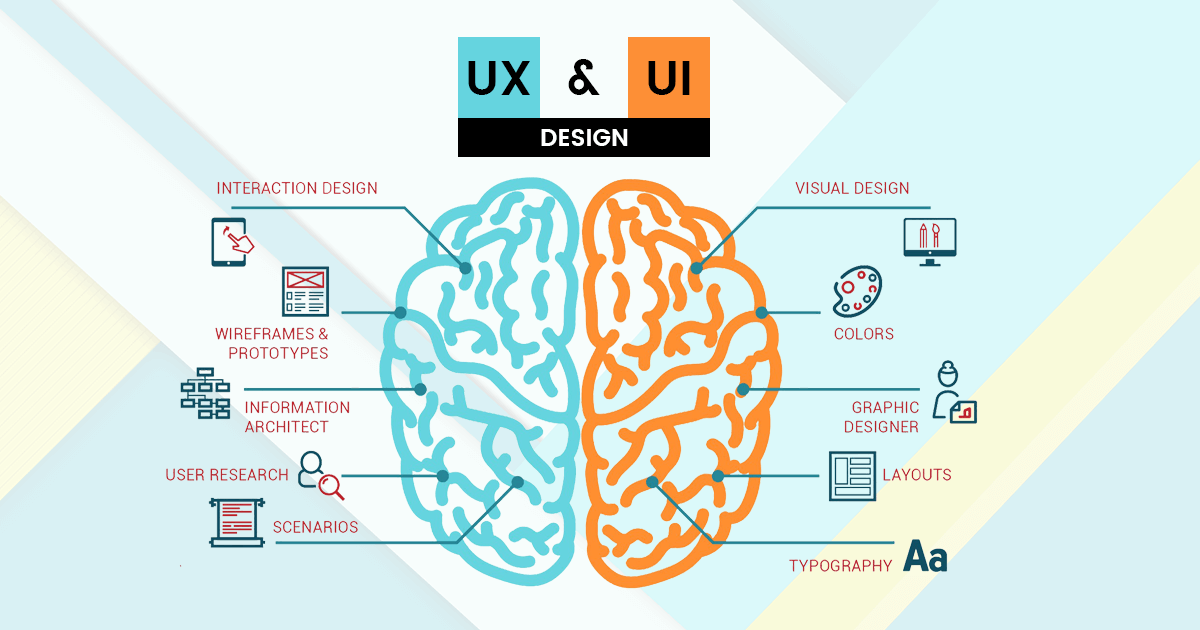
UI and UX (User Experience) design often get confused, but they are distinct. While UI design focuses on how things look, UX design focuses on how things work. Consider them as two sides of the same coin. UI is the form, UX is the function. Together, they create a seamless user experience. ###Why Is Ui Design Important?
Good UI design can make or break a product. If users find an interface confusing or unpleasant, they’re unlikely to return. On the other hand, a well-designed interface enhances user satisfaction and engagement. Think of your favorite app. What keeps you coming back? Chances are, it’s the ease of use and the pleasant design. That’s the power of UI design. ###Practical Tips For Beginners
Are you curious about starting in UI design? Begin by observing. Pay attention to the interfaces you interact with daily. Notice what works and what doesn’t. Experiment with design tools like Figma or Adobe XD. Start small, perhaps by redesigning a simple screen of an app you use. You’ll learn best by doing, not just reading. UI design is a fascinating field with endless opportunities for creativity. Have you ever wondered how a small tweak in design could impact user satisfaction? Dive in and explore the possibilities.Importance Of Ui Design
Understanding the importance of UI design can make or break your digital experience. It’s not just about making things look pretty; it’s about creating a seamless interaction between the user and your product. Think about the last time you visited a website and couldn’t find what you needed. Frustrating, right? That’s where UI design steps in to save the day.
Enhancing User Experience
Good UI design enhances user experience by guiding users effortlessly through your interface. Imagine visiting a website where everything is intuitive. You instinctively know where to click next. That’s the magic of effective UI design.
It reduces the cognitive load on users, making it easier for them to find information quickly. When users can navigate without confusion, they’re more likely to stay longer and explore further. This is crucial for keeping them engaged and interested.
Building Brand Trust
UI design plays a pivotal role in building brand trust. A well-designed interface conveys professionalism and reliability. Users often judge the credibility of your brand based on the quality of your interface.
Think about a time when you visited a website that seemed cluttered or outdated. Did you trust it? Probably not. A clean, modern UI design signals to users that your brand values quality and attention to detail.
Increasing Conversion Rates
Did you know that UI design can directly impact your conversion rates? An intuitive design leads users smoothly to your call-to-action. When users don’t face obstacles, they’re more likely to complete desired actions, like signing up or making a purchase.
Consider how many times you’ve abandoned a transaction due to a confusing checkout process. A streamlined UI design eliminates these barriers, making it easier for users to convert.
Staying Competitive
In today’s digital world, staying competitive requires a top-notch UI design. With so many options available, users won’t hesitate to move to a competitor’s site if yours isn’t up to par. Your UI design is a reflection of your brand’s quality and innovation.
Ask yourself: is your interface engaging and easy to use, or is it pushing potential customers away? Keeping your UI design fresh and user-friendly can keep you ahead in the race.
UI design is more than aesthetics; it’s about creating meaningful interactions. By prioritizing it, you not only enhance user experience but also build trust, boost conversions, and stay competitive. So, what steps will you take to improve your UI design today?
Key Principles Of Ui Design
User Interface (UI) design is the art of crafting digital environments where users feel comfortable and engaged. The key principles of UI design are the guiding rules that help you create interfaces that not only look good but also function seamlessly. Grasping these principles will empower you to create user-friendly designs that make navigating a digital space intuitive and enjoyable.
Consistency
Consistency in UI design involves using similar elements and patterns throughout your interface. Imagine visiting a website where every page looks different; you’d likely feel lost and frustrated. Consistency helps users recognize patterns and predict actions, making navigation smoother.
Think of it like driving a car—once you’re familiar with where the controls are, you can focus on the journey instead of searching for the brake pedal. Use consistent color schemes, typography, and button styles to give users a coherent experience. Have you ever felt confused on a website due to inconsistent design?
Simplicity
Simplicity is about reducing complexity and focusing on what’s essential. A cluttered interface overwhelms users and makes it difficult for them to find what they’re looking for. Strip away unnecessary elements, and prioritize clarity over fanciness.
Consider how frustrating it is to search through a crowded closet for your favorite shirt. Aim for a clean design that highlights key actions and information. A simple interface invites users to explore rather than retreat.
How does simplicity in design influence your decision to stay on a website or app?
Feedback
Feedback in UI design means providing users with responses to their actions. When you click a button, you expect something to happen, right? Feedback ensures that users know their actions are recognized and processed. It’s like receiving a nod when you greet someone.
Imagine clicking a submit button without receiving any confirmation—did your input go through? Use visual cues like loading icons or confirmation messages to reassure users. Feedback creates a dialogue between your interface and its users, fostering trust.
Have you ever been uncertain whether an online action was successful due to lack of feedback?
As you apply these principles in your designs, you not only create functional interfaces but also enhance user satisfaction. These principles are your toolkit for building digital spaces that users love to explore. What’s your next step in refining your UI designs?
Ui Design Elements
User Interface (UI) Design Elements are crucial for any digital product. They guide users and enhance their experience. Understanding these elements helps create intuitive interfaces. Let’s dive into the key components of UI design.
Typography
Typography is the art of arranging text. It affects readability and user engagement. Choose fonts that match your brand’s personality. Ensure text is legible on all devices. Use different font sizes to create hierarchy. Bold text draws attention to important information.
Color Schemes
Colors evoke emotions and set the mood. A well-chosen color scheme enhances user experience. Use colors to highlight key actions. Ensure color contrast for readability. Keep your palette consistent with your brand identity. Balance is key in color choice.
Icons And Buttons
Icons represent actions and concepts visually. They simplify communication. Use familiar icons to avoid confusion. Buttons prompt user interaction. Design buttons to be noticeable and clickable. Ensure they stand out from other elements. Consistency in style is vital for usability.
Tools For Ui Design
UI design tools are crucial for creating effective interfaces. They help designers visualize, prototype, and collaborate efficiently. Choosing the right tool can influence the design process. Each tool offers unique features for different design needs. This section explores popular UI design tools that have transformed how designers work.
Sketch
Sketch is a widely used UI design tool. It is known for its vector-based design capabilities. Designers appreciate its simplicity and intuitive interface. Sketch offers powerful plugins for enhanced functionality. These plugins enable seamless integration with other design tools. It is ideal for creating wireframes, prototypes, and high-fidelity designs.
Adobe Xd
Adobe XD is a versatile UI design tool. It supports both design and prototyping needs. Its user interface is clean and easy to navigate. Adobe XD allows designers to create interactive prototypes quickly. Sharing designs for feedback is straightforward. Collaboration features make it popular among design teams.
Figma
Figma is a cloud-based UI design tool. It excels in real-time collaboration. Multiple users can work on a design simultaneously. Figma is accessible from any device with internet access. Its interface is user-friendly and efficient. Designers use Figma for creating and sharing design systems. It is favored for its collaborative features and flexibility.

Credit: www.geeksforgeeks.org
Ui Design Process
Exploring the UI design process unveils the art of crafting intuitive digital interfaces. Designers focus on layout, colors, and fonts to enhance user experience. Understanding users’ needs and behaviors guides each step, ensuring effective communication and seamless interaction.
Creating an intuitive user interface (UI) is like crafting a welcoming storefront for your digital product. The UI design process is a roadmap that guides you from initial ideas to a polished digital experience. It involves several crucial steps that ensure your design is user-friendly and efficient.Research And Analysis
Before diving into design, understanding your audience is key. Who are they? What do they need? Conduct surveys and interviews to gather insights. Analyze competitors’ interfaces to identify strengths and gaps. Consider a time when you downloaded an app just because its interface was clean and easy to use. What made it stand out to you? Your users will appreciate that same clarity.Wireframing
Wireframes are the blueprint of your UI design. They help visualize the layout without the distraction of colors and graphics. Sketch basic elements and their placement. Imagine arranging furniture in your living room before deciding on the decor. This step gives you a clear structure before adding the aesthetic touches. Invite feedback from peers or stakeholders to refine your wireframes. What could be improved? What feels out of place?Prototyping
Prototyping brings your wireframes to life with interactive elements. It allows you to simulate the user experience and test functionality. Use tools like Sketch or Adobe XD to create clickable prototypes. Think back to a time when you tested a new feature on an app. How did it feel navigating through it? Prototyping lets you experience your design before the final build. Engage with potential users to gather feedback. Is the navigation intuitive? Are tasks easy to complete? Their insights can be invaluable for adjustments.The UI design process is not just about creating something pretty. It’s about crafting an experience that resonates with users. Each step, from research to prototyping, plays a vital role in ensuring your design serves its purpose effectively. How will you make your UI stand out?
Common Ui Design Mistakes
Understanding common UI design mistakes helps improve user experience. Overcrowded layouts confuse users and slow navigation. Poor color choices can strain eyes and hinder readability.
In user interface (UI) design, avoiding common mistakes is crucial. These errors can hinder user experience and affect engagement. By understanding these pitfalls, designers can create intuitive and efficient interfaces.Overloading With Information
Too much information overwhelms users. They can’t process all at once. This leads to confusion and frustration. Keep content concise and focused. Ensure the most important information stands out. Use whitespace effectively to give breathing room. This aids in digesting content easily.Ignoring User Feedback
User feedback is a goldmine of insights. Ignoring it is a mistake. It helps identify pain points and areas of improvement. Regularly gather feedback through surveys and usability tests. Make adjustments based on user input. This builds trust and ensures the UI meets user needs.Poor Navigation
Navigation should guide users seamlessly. Poor navigation frustrates and causes users to leave. Ensure a clear and consistent menu structure. Use familiar icons and terms. Users should find what they need with few clicks. A well-designed navigation improves user satisfaction and keeps them engaged.Trends In Ui Design
In the digital world, User Interface (UI) Design shapes user experiences. UI design trends are constantly evolving. Designers aim to create intuitive and engaging interfaces. These trends reflect changing user needs and technological advances. Staying updated with trends ensures relevance in digital design.
Minimalism
Minimalism focuses on simplicity and clarity. It reduces clutter and distractions. Users find it easier to navigate minimalist interfaces. Designers use ample white space and simple elements. This creates a clean and focused user experience.
Dark Mode
Dark Mode has gained popularity for its aesthetic and functional benefits. It reduces eye strain in low-light conditions. Many users prefer its sleek and modern look. Designers offer dark themes as options in their applications. This trend enhances user comfort and choice.
Microinteractions
Microinteractions are small design elements. They guide users through an interface. Simple animations or feedback messages are examples. Microinteractions enhance user engagement and provide instant feedback. They make interactions more intuitive and enjoyable.
Resources For Learning Ui Design
Learning User Interface (UI) design can feel like a vast ocean. But, plenty of resources can guide you. Whether you prefer online courses, books, or engaging with design communities, there’s something for you.
Online Courses
Online courses offer flexibility and structure. Platforms like Coursera and Udemy provide comprehensive UI design courses. These courses often include videos and quizzes. Some platforms also offer certificates upon completion. LinkedIn Learning is another great source. It offers courses tailored for beginners and advanced learners.
Books
Books are timeless resources for learning UI design. “Don’t Make Me Think” by Steve Krug is a classic. It breaks down complex topics into simple terms. “The Design of Everyday Things” by Don Norman is also popular. It explores the principles of good design. Both books offer valuable insights and practical tips.
Design Communities
Design communities are vibrant and interactive. They provide spaces to share ideas and get feedback. Websites like Dribbble and Behance showcase creative work. These platforms are great for inspiration. Joining forums like Reddit’s design community can be beneficial. Here, you can ask questions and learn from others’ experiences.
Credit: medium.com

Credit: hitmarker.net
Frequently Asked Questions
What Is Ui/ux For Beginners?
UI/UX design involves creating user-friendly interfaces for digital products. UI focuses on visual elements, while UX ensures ease of use and satisfaction. Beginners should understand the basics of design principles and user-centered approaches to craft effective and engaging experiences.
What Is The 6-3-1 Rule In Ui Design?
The 6-3-1 rule in UI design encourages designers to create six rough sketches, refine three into detailed designs, and finalize one for the best user interface. This approach fosters creativity, efficiency, and effective decision-making, ensuring a well-thought-out design process and optimal user experience.
What Are The Basics Of User Interface Design?
User interface design basics include simplicity, consistency, clarity, and intuitive navigation. Ensure responsive design for various devices. Use familiar elements and prioritize user feedback. Maintain visual hierarchy and balance aesthetics with functionality.
Can I Teach Myself Ux Ui Design?
Yes, you can teach yourself UX UI design. Utilize online resources, courses, and practice consistently. Join design communities for feedback and networking. Build a strong portfolio to showcase your skills. Stay updated with industry trends and tools to enhance your knowledge.
Conclusion
User Interface design is crucial for effective digital experiences. A well-crafted UI enhances user interaction and satisfaction. It combines aesthetics with functionality, ensuring users navigate smoothly. Start simple. Focus on user needs and usability. Consistency in design elements is key.
Color, typography, and layout matter. They guide users intuitively. Keep testing. Learn from user feedback to improve continuously. Remember, a good UI is not just about looks. It’s about seamless interaction. As technology evolves, so should your designs. Stay updated.
Embrace change and innovation for successful UI design.