Have you ever wondered how your favorite apps and websites are designed? The sleek layout, intuitive navigation, and engaging user experience all start with a crucial step: wireframes and prototypes.
These tools are the backbone of digital design, helping creators visualize and refine their ideas before they come to life. By understanding wireframes and prototypes, you can unlock the secrets behind great design and even improve your own projects. Imagine knowing exactly how to shape your digital presence to captivate and retain your audience.
Dive into this article to discover how these powerful tools can transform your approach to design, making your ideas not just come to life, but thrive in the digital world.
Wireframes Basics
Understanding wireframes is essential in web and app design. They serve as blueprints, outlining structure and functionality. Prototypes take this further, offering a more interactive experience, allowing designers to test user interactions before final development.
Understanding the basics of wireframes can feel like unlocking a new level in your design journey. Whether you’re a newbie or have some experience, grasping these fundamentals is crucial. Wireframes are the blueprint of your digital projects, guiding you from idea to execution. ###Definition And Purpose
Wireframes are simplified sketches of a web page or app layout. They focus on structure and functionality rather than design aesthetics. Their primary purpose is to map out the basic design elements, helping you visualize the project’s framework before diving into detailed design and development. Think of wireframes as the skeleton of your project. They help identify the placement of elements like buttons, navigation bars, and images. This early stage visualization ensures everyone involved shares the same understanding of the project’s direction. ###Key Elements
Wireframes typically include several crucial elements. The layout outlines the structure, showing where each component will sit on the page. This helps in understanding how users will navigate your site or app. Text placeholders, often represented by lines or boxes, indicate where content will be. They highlight the importance of prioritizing information hierarchy early on. Interactive elements are marked to show potential user actions. For instance, buttons and links are often depicted with simple shapes or text labels. This ensures your team knows how users will engage with the interface. Creating effective wireframes involves balancing simplicity with clarity. Don’t overcomplicate with unnecessary detail. Instead, focus on the essentials that will guide your project to success. Have you ever skipped the wireframe stage in a project? Reflect on how that decision impacted the final result. Understanding the basics can prevent costly mistakes down the line. Embrace wireframes as a vital step in your design process.Types Of Wireframes
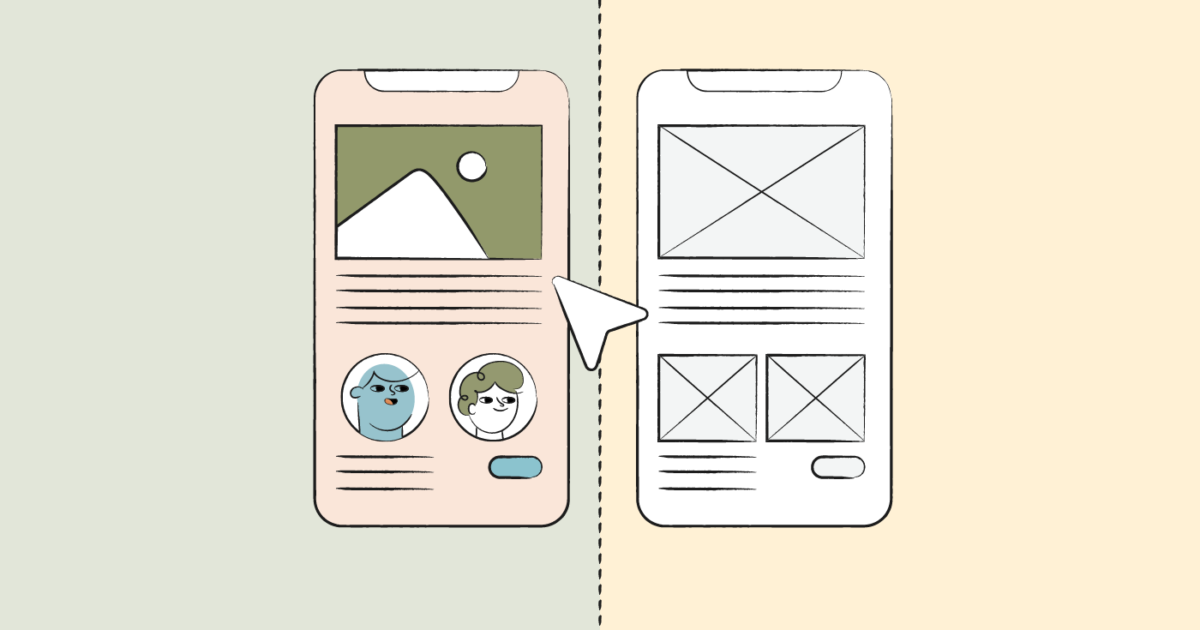
Wireframes come in three main types: low-fidelity, mid-fidelity, and high-fidelity. Low-fidelity wireframes use simple sketches to outline layout ideas. Mid-fidelity wireframes add more details, like text placement and basic visuals. High-fidelity wireframes closely resemble the final product, featuring colors, images, and interactive elements.
Wireframes are the backbone of any design project, acting as a guide to ensure your vision translates into reality. Understanding the types of wireframes can help you choose the right tool for your project. They come in various forms, each serving a unique purpose. Whether you’re sketching ideas on a napkin or crafting detailed designs, the right wireframe can make a world of difference in your creative process.Low-fidelity Wireframes
Low-fidelity wireframes are like the rough drafts of design. They are simple sketches, often created using pen and paper or basic digital tools. These wireframes focus on layout and functionality rather than aesthetics. Imagine you’re brainstorming ideas with a friend over coffee. You grab a napkin and start sketching a website layout. That’s a low-fidelity wireframe in action. It’s quick and easy, allowing you to capture ideas without getting bogged down by details. The beauty of low-fidelity wireframes lies in their simplicity. They help you communicate initial ideas and iterate rapidly. If you’re working in a team, these wireframes can foster collaboration and feedback, setting the stage for more detailed designs later.High-fidelity Wireframes
High-fidelity wireframes are the polished version of your design blueprint. They include detailed elements like colors, fonts, and images. These wireframes closely resemble the final product and are often created using advanced design software. Think of high-fidelity wireframes as the dress rehearsal before the big show. They allow you to see how the final design will look and function. You can test user interactions and ensure everything aligns with your project’s goals. Creating high-fidelity wireframes requires more time and skill, but they provide a clearer picture of the end product. If you’re presenting your design to stakeholders or clients, high-fidelity wireframes can help convey the vision more effectively. Choosing between low and high-fidelity wireframes depends on your project’s needs. Are you just getting started and need to brainstorm ideas quickly? Or do you need a detailed representation of your design for a client presentation? Each type of wireframe offers unique benefits and can significantly impact your design process. What will you choose for your next project?Prototypes Essentials
Prototypes are key in transforming ideas into reality. They allow designers to test concepts before full development. Understanding prototypes is crucial for creating effective designs. This section explores essential aspects of prototypes in the design process.
What Are Prototypes?
Prototypes are early models of a product. They show how a product will look and work. Designers use them to explore different ideas. Prototypes help in visualizing and testing concepts. They can be digital or physical, offering a clear picture of the design.
Role In Design Process
Prototypes play a vital role in the design process. They bridge the gap between ideas and final products. Designers use prototypes to test user interactions. This helps in identifying design flaws early. Prototypes enable feedback collection from users. Feedback helps refine the design for better usability.
Prototypes also aid in communicating ideas to stakeholders. They provide a tangible version of the design. This makes it easier to discuss and make decisions. Prototypes streamline the design process by reducing guesswork. They save time and resources, ensuring a successful design outcome.

Credit: www.eleken.co
Wireframes Vs. Prototypes
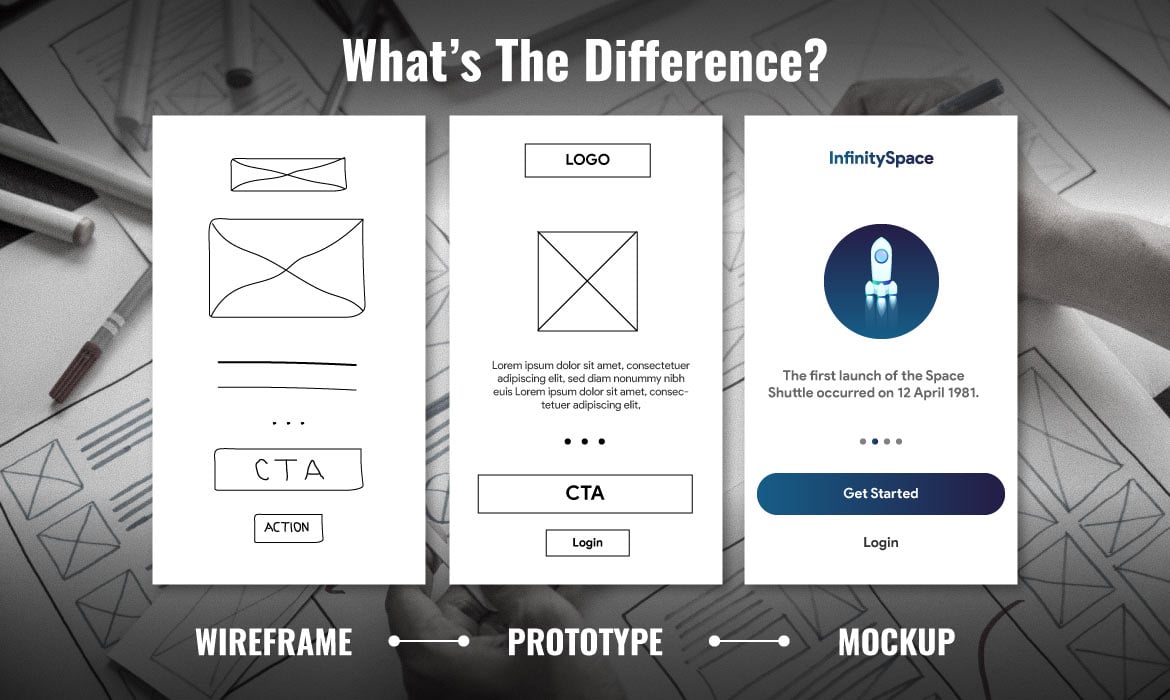
Exploring wireframes and prototypes reveals their unique roles in design. Wireframes outline structure, focusing on layout and navigation. Prototypes bring designs to life, showcasing interaction and functionality. Understanding both enhances the design process, ensuring clear communication and effective development.
In the world of design, wireframes and prototypes are crucial tools. They help designers plan and visualize digital products. Both have distinct roles, yet they often create confusion. Understanding their differences and similarities can improve your design process.Differences And Similarities
Wireframes are simple sketches. They represent the basic structure of a website or app. Their primary focus is layout. They use lines, boxes, and placeholder text. Prototypes, on the other hand, are interactive models. They mimic the final product’s functionality. Both wireframes and prototypes aim to communicate design ideas. Wireframes emphasize structure and content placement. Prototypes focus on user interaction. Both tools help identify design issues early. They allow feedback before development begins.When To Use Each
Wireframes are ideal during the early design stages. They are quick to create and easy to change. Use them to outline key elements and layout. They help stakeholders understand the project’s scope. Prototypes are useful later in the design process. They simulate user interactions and provide a realistic feel. Use them to test usability and gather user feedback. They help refine design decisions before coding starts. Choosing between wireframes and prototypes depends on the project’s needs. Each serves a unique purpose and adds value to the design process.Tools For Wireframing
Wireframing tools simplify the creation of early design drafts for websites and apps. They allow designers to plan layouts and functionality efficiently. Understanding wireframes and prototypes is essential for visualizing the user journey and ensuring seamless design transitions.
When diving into the world of wireframes and prototypes, the right tools can make a significant difference. Wireframing is a crucial step in the design process, helping you visualize and plan the structure of your digital product. Whether you’re a beginner or a seasoned designer, selecting the right software can streamline your workflow and enhance your creativity. Let’s explore some popular software options and guide you in choosing the perfect tool for your projects. ###Popular Software Options
Navigating through the array of wireframing tools available can be overwhelming. Popular options include Sketch, Adobe XD, and Figma. Each offers unique features tailored to different needs. Sketch is well-loved for its simplicity and focus on UI/UX design. Adobe XD integrates seamlessly with other Adobe Creative Cloud apps, making it a favorite among designers who already use Adobe products. Figma stands out with its cloud-based platform, allowing real-time collaboration, which is ideal for team projects. ###Choosing The Right Tool
Selecting a wireframing tool depends on several factors. Consider your team’s size and the level of collaboration needed. Figma might be your best bet if you’re working in a team due to its real-time collaboration feature. Think about your familiarity with design software. If you’re already comfortable with Adobe tools, Adobe XD could offer a smoother transition. Also, assess the complexity of your projects. Sketch provides a straightforward interface for simpler designs, but may not support advanced functionalities required for more complex prototypes. Ask yourself: What are your specific design needs? Are you looking for a tool that offers extensive plugins and integrations? Is ease of use a priority, or do you need advanced features? Your answers will guide you towards the right choice, ensuring a more efficient and enjoyable wireframing experience.Prototyping Tools
Explore prototyping tools to grasp wireframes and prototypes. These tools simplify designing, testing, and refining ideas visually. Improve understanding of user experiences and interface design efficiently.
Understanding wireframes and prototypes is a crucial part of the design process. The right prototyping tools can transform your ideas into tangible, testable models, allowing you to refine your concepts before they go live. But with so many options out there, how do you choose the right software for your needs? ###Top Prototyping Software
Navigating the world of prototyping tools can feel overwhelming. Adobe XD, Sketch, and Figma are among the most popular. Each offers unique features tailored to different needs. Adobe XD is known for its seamless integration with other Adobe products, making it a favorite for designers already in the Adobe ecosystem. Sketch, on the other hand, is appreciated for its simplicity and ease of use, especially among Mac users. Figma stands out with its collaborative features, allowing multiple team members to work on a project simultaneously. Your choice will depend on your project’s specific requirements and your team’s workflow. Which tool aligns best with your team’s needs? ###Features To Consider
Selecting the right tool goes beyond choosing the most popular option. Look for features that match your project’s goals. – Ease of Use: Is the tool user-friendly? Can you and your team navigate it without extensive training? – Collaboration Capabilities: Does it allow for real-time collaboration? This feature can be a game-changer for teams working remotely. – Integration: How well does it integrate with other tools you use, like project management or design software? – Cost: Consider your budget. Some tools offer free versions with limited features, while others require a subscription. – Flexibility: Does the software support various types of prototypes, from low-fidelity wireframes to high-fidelity interactive models? Reflecting on my own experience, I once chose a tool simply because it was the industry standard. However, it turned out to be overly complex for a small project. I learned that understanding your project’s specific needs is key. Have you ever faced a similar situation? Choosing the right prototyping tool is a critical step in bringing your designs to life. By considering the features that matter most to you and your team, you can streamline the design process and create prototypes that truly represent your vision.Best Practices
Understanding wireframes and prototypes is crucial in design. Both play a vital role in creating user-friendly interfaces. Best practices guide designers to craft effective wireframes and prototypes.
Effective Wireframing Tips
Start with a clear goal. Know what you want to achieve. Sketch your ideas first on paper. It helps to visualize the layout. Keep designs simple and uncluttered. Focus on the structure, not the details. Use placeholder text and images. This avoids distractions. Make sure navigation is easy to follow. Use consistent labeling and symbols. Stick to a grid system. It ensures alignment and balance. Gather feedback early. It saves time and effort.
Prototyping Strategies
Build prototypes based on user needs. Understand their pain points. Choose the right fidelity. Low-fidelity prototypes are quick and easy. High-fidelity prototypes mimic the final product. Test often and iterate. Prototypes should evolve with feedback. Use interactive elements to engage users. It makes the prototype feel real. Document changes and decisions. This keeps everyone informed. Keep prototypes accessible. They should be easy to share and view.
Common Mistakes
Many overlook the importance of defining clear objectives before creating wireframes. Misunderstanding their purpose can lead to ineffective prototypes. Others may skip feedback stages, missing valuable insights for improvement.
When learning about wireframes and prototypes, it’s easy to fall into common traps that can derail your design process. These mistakes can lead to wasted time and effort, or even a product that doesn’t meet users’ needs. Understanding these pitfalls will help you create more effective designs and prototypes that truly serve your audience.Avoiding Wireframe Pitfalls
Wireframes are essential for mapping out the basic structure of a website or app. Yet, many designers make the mistake of adding too much detail too soon. This can lead to confusion and miscommunication among team members. Keep wireframes simple—focus on layout and functionality first, not aesthetics. Another frequent error is failing to prioritize user experience. You might feel tempted to design based on personal preferences or assumptions. Always remember, wireframes should reflect user needs and behaviors. Conduct user research and testing to validate your design choices. Skipping feedback from stakeholders is also a common mistake. You might think your wireframe is perfect, but others might spot critical issues. Regularly review your wireframes with your team and stakeholders to ensure alignment with project goals.Prototyping Errors
Creating prototypes is a crucial step in the design process, but rushing through it can lead to significant setbacks. One common mistake is not testing prototypes with real users. It’s easy to assume that your design works well, but only user testing can confirm this. Gather feedback early and often to refine your prototype effectively. Another error is overcomplicating the prototype. While it’s important to make the prototype interactive, adding unnecessary features can make it difficult to use. Focus on core functionalities that need testing and refine those before adding additional elements. Lastly, neglecting to iterate based on feedback can doom your prototype. Even if you receive negative feedback, it’s an opportunity to improve. Ask yourself, “What can I learn from this?” and use the insights to enhance your design. What other common mistakes have you encountered in your design journey? Share your thoughts and experiences in the comments below!Future Trends
Wireframes and prototypes are evolving every day. Designers need to keep up with the latest trends. This will ensure better user experiences. Let’s explore some future trends in this field.
Advancements In Tools
New tools are making design easier. These tools offer more features. They help create wireframes faster. Collaboration is also becoming smoother. Designers can work together in real-time. This saves time and reduces errors.
Artificial intelligence is now part of design tools. AI helps in predicting user behavior. This makes designs more user-friendly. Machine learning is also helping designers. It suggests design improvements based on data.
Emerging Design Trends
Simplicity is trending in design. Simple layouts are easier for users. Designers are using fewer elements. This helps users focus on the main content.
Responsive design is more important now. Users access sites from many devices. Designs must adapt to different screen sizes. This ensures a good experience on any device.
Interactive prototypes are gaining popularity. They provide a realistic experience. Users can interact with the design. This helps in understanding the final product better.
Credit: www.springboard.com
Credit: theproductmanager.com
Frequently Asked Questions
What Do You Need To Know About Wireframes And Prototypes?
Wireframes outline a website’s structure and layout. Prototypes simulate user interaction and functionality. Both are essential for web design, improving user experience and communication between designers and stakeholders. Understanding these tools helps streamline the development process and enhances project success.
How Do I Learn Wireframes?
Begin with online courses on wireframing basics. Practice using tools like Sketch or Figma. Study design principles and analyze existing wireframes. Join design communities to seek feedback and share insights.
What Are The 2 Types Of Wireframes?
Wireframes come in two types: low-fidelity and high-fidelity. Low-fidelity wireframes are basic sketches focusing on layout. High-fidelity wireframes are detailed, resembling the final design with specific features and elements. Both types are essential for visualizing and planning website or app design efficiently.
Is Wireframing Part Of Ux Or Ui?
Wireframing is a crucial part of UX design. It helps in planning the layout and structure. Wireframes focus on user experience and functionality rather than visual design elements. They serve as a blueprint for both UX and UI designers.
Conclusion
Wireframes and prototypes are essential in web design. They help visualize ideas clearly. Both tools save time and reduce errors. Wireframes give a basic layout. Prototypes add detail and interaction. Understanding their differences is crucial. Designers can communicate better with teams and clients.
This improves the final product. Beginners should practice creating both. Experiment with different tools and techniques. Gain confidence and skills with each project. Remember, a solid foundation leads to successful designs. Embrace the learning process. Enjoy the creativity and innovation it brings.
Happy designing!