Adobe has many software tools for design work. Two popular ones are Adobe Illustrator and Adobe InDesign. Both help people make beautiful designs. But they work in different ways. Knowing the difference can help you choose the right tool.
What is Adobe Illustrator?
Adobe Illustrator is a program for making drawings. It works with vector graphics. Vector graphics use lines and shapes. These shapes can change size without losing quality. This means you can make a small logo or a big poster. The logo will always look sharp.
People use Illustrator to create logos, icons, and drawings. It is good for making images that need to stay clear at any size. Illustrator has many tools to draw shapes, lines, and colors. You can also add text, but it is not the main focus.
Main Uses Of Adobe Illustrator:
- Creating logos and icons
- Making illustrations and drawings
- Designing posters and flyers
- Working with shapes and paths
- Creating vector art that resizes easily
What is Adobe InDesign?
Adobe InDesign is a program for page layout. It helps arrange text and images on pages. It is perfect for books, magazines, and brochures. InDesign makes multi-page documents easy to manage.
InDesign focuses on how text looks on a page. It has tools for fonts, spacing, and alignment. You can place pictures and graphics inside the layout. But it does not create drawings or illustrations like Illustrator.
Main Uses Of Adobe Indesign:
- Designing books and eBooks
- Making magazines and newspapers
- Creating brochures and flyers
- Arranging text and images in layouts
- Managing multi-page documents
Key Differences Between Illustrator and InDesign
| Feature | Adobe Illustrator | Adobe InDesign |
|---|---|---|
| Primary Purpose | Creating vector illustrations and graphics | Page layout and text arrangement |
| Best For | Logos, icons, drawings, and artwork | Books, magazines, brochures, and flyers |
| Graphic Type | Vector graphics (scalable without loss) | Combines text and images in layouts |
| Text Handling | Basic text tools, not for long documents | Advanced typography and paragraph control |
| Multi-Page Support | Limited, mainly single artboards | Designed for multi-page documents |
| Image Editing | Basic image placement and tracing | Advanced image placement and linking |
| File Output | EPS, AI, SVG, PDF | PDF, EPUB, Print-ready files |
When to Use Adobe Illustrator
Choose Illustrator when you want to create images. If you need to draw logos, icons, or shapes, Illustrator is best. It helps to make clean, smooth lines and curves.
Illustrator is good for designs that change size. For example, a logo on a business card or a billboard. The image will stay clear and sharp.
Illustrator is also great for digital art and cartoons. It gives many tools to color and shape the artwork. But it is not made for text-heavy projects.
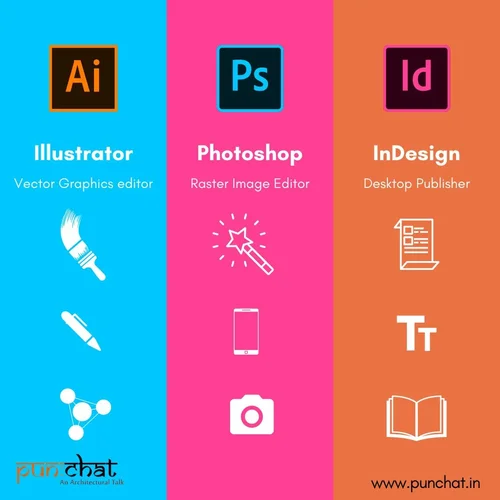
Credit: www.punchat.in
When to Use Adobe InDesign
Choose InDesign if you work with many pages. It helps you organize text and images well. InDesign is made to handle books, magazines, and catalogs.
InDesign has tools to control fonts, spacing, and paragraphs. This makes long text look nice and easy to read. It also helps keep all pages consistent.
InDesign works well for print and digital publishing. It can export files for printing or for digital reading. But it is not designed for drawing or creating graphics.

Credit: www.youtube.com
How Illustrator and InDesign Work Together
Even though these programs are different, they often work together. You can create a logo in Illustrator. Then place that logo inside an InDesign layout.
This way, you get the best of both worlds. Illustrator makes the graphics. InDesign arranges the text and images on pages.
This teamwork is common in design projects. For example, a magazine might have many photos and text in InDesign. The cover might have a logo or drawing made in Illustrator.
Summary
Adobe Illustrator is for creating art and graphics. It uses vectors. You draw and color images that can grow or shrink without losing quality.
Adobe InDesign is for putting text and images on pages. It is best for multi-page documents like books or brochures. It helps make text easy to read and layouts consistent.
Both programs are important for designers. But they serve different needs. Knowing the difference helps you pick the right tool. Or use both together for better results.
In short:
- Use Illustrator for drawing and creating graphics.
- Use InDesign for layout and text-heavy projects.
This knowledge will make your design work easier and clearer. Choose the tool that fits your project needs.
Frequently Asked Questions
What Is Adobe Illustrator Used For?
Adobe Illustrator is mainly used for creating vector graphics and illustrations.
What Is Adobe Indesign Designed For?
InDesign is designed for page layout and print-ready document design.
Can Illustrator Create Multi-page Documents?
No, Illustrator is not ideal for multi-page document layouts.
Does Indesign Support Vector Graphics?
Yes, InDesign supports vector graphics but focuses on layout and text.