Have you ever wondered why the images on your computer screen or smartphone look sharp or sometimes blurry? The secret lies in a term called Pixels Per Inch, or PPI.
Understanding PPI can unlock the mystery behind crisp visuals and help you make better decisions when buying devices or editing photos. Imagine knowing exactly how to choose the best display for your needs or how to make your photos look stunningly clear.
This article will dive into what PPI means for you, and why it’s crucial in our digital world. Prepare to uncover the simple yet powerful concept that affects everything you see on a screen. Don’t miss out on learning how PPI impacts your everyday digital experience.
Credit: app.uxcel.com
Defining Pixels Per Inch
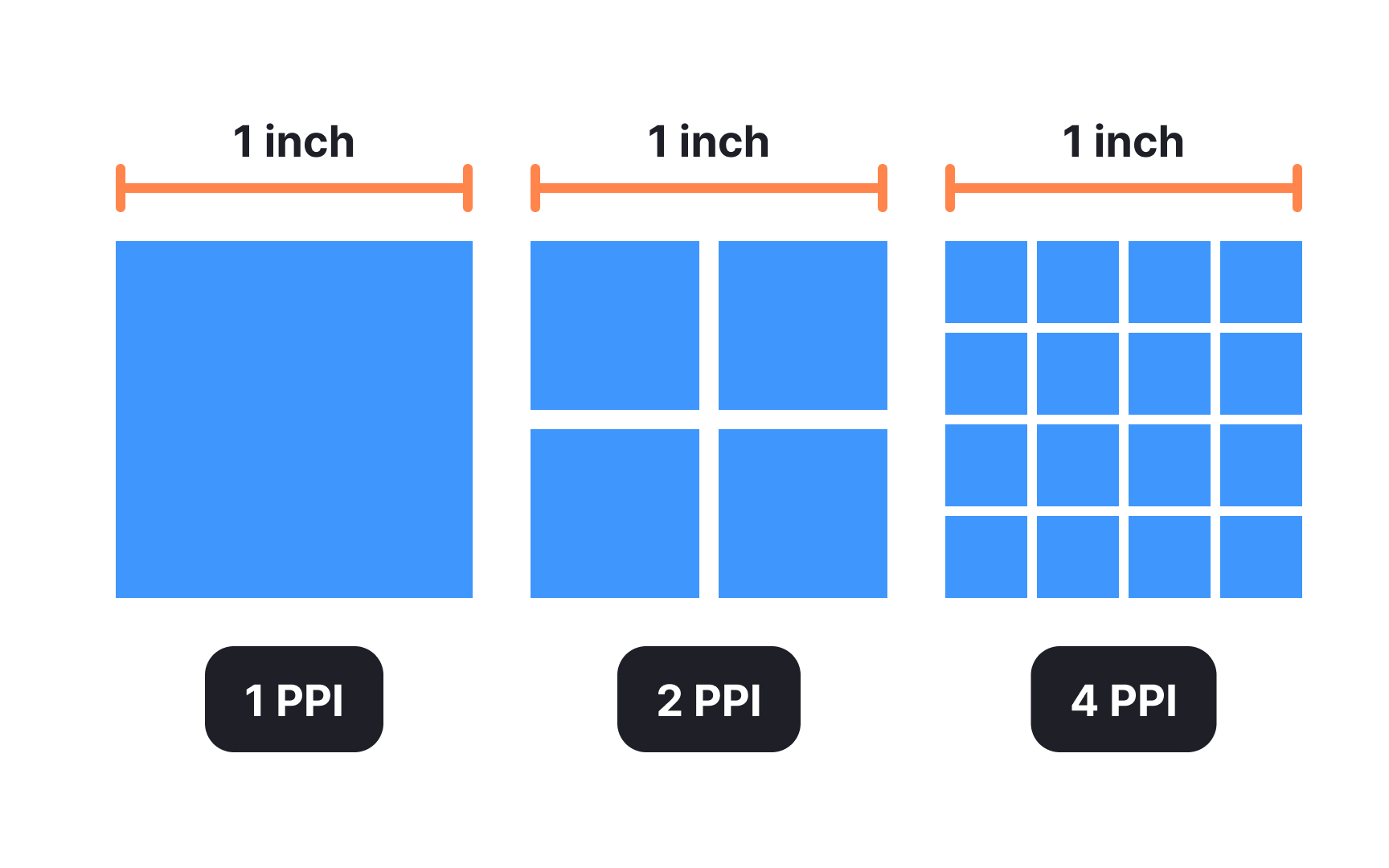
Pixels Per Inch (PPI) is a crucial term in digital imaging. It defines the resolution of an image, representing how many pixels fit within an inch. Understanding PPI helps in evaluating image quality and clarity. Higher PPI means sharper images. This knowledge is vital for photographers, graphic designers, and anyone working with digital media. Let’s dive deeper into what PPI truly signifies.
PPI is a measurement of image resolution. It counts the pixels within a physical inch. Each pixel represents a tiny dot of color. Together, pixels form the complete image you see. More pixels per inch lead to finer detail.
Devices like monitors and printers use PPI to display images. A screen with high PPI shows clearer visuals. This is important for tasks needing precision, like photo editing. Low PPI can result in blurry images.
PPI differs from DPI (Dots Per Inch). DPI relates to printing rather than screen display. Both are important for achieving the best image quality. Understanding these terms helps choose the right settings for your work.
Why Ppi Matters
PPI affects how images appear on different devices. A high PPI ensures images look crisp on high-resolution screens. This is crucial for professional presentations. It also impacts printing quality. Knowing your device’s PPI helps in selecting the right image resolution.
Web designers often consider PPI for optimal site visuals. Display settings can change how images are perceived. Ensuring the correct PPI setting enhances user experience. It’s a key factor in delivering quality content online.
Importance Of Ppi In Displays
Pixels Per Inch (PPI) defines the detail in display screens. It measures the number of pixels per inch of a screen. Higher PPI means more pixels packed into each inch, enhancing image clarity. Understanding PPI helps users choose the right screen for their needs.
Impact On Image Quality
Image quality depends heavily on PPI. Higher PPI results in sharper images. It provides clearer details and vibrant colors. Screens with low PPI may appear blurry. Text and graphics also appear more distinct with high PPI.
Artists and designers often prefer high PPI screens. They need precision for their work. Detailed images help in producing quality designs. Watching movies or playing games is more enjoyable. High PPI offers a richer visual experience.
Role In Screen Resolution
Screen resolution and PPI are closely linked. Resolution refers to the number of pixels on a screen. It is expressed as width by height. High resolution means more pixels, enhancing detail. PPI calculates the density of these pixels.
Two screens with the same resolution can have different PPI. A smaller screen size means higher PPI. This makes images sharper. PPI helps consumers understand screen quality. It is vital for selecting devices like smartphones and monitors.
Ppi In Different Devices
Pixels per inch (PPI) is crucial in understanding screen quality. Different devices use varied PPI to display images and text. This affects clarity, sharpness, and visual experience. Let’s explore how PPI varies across smartphones, tablets, laptops, monitors, and television screens.
Smartphones And Tablets
Smartphones boast high PPI for crisp visuals. Most modern phones have over 300 PPI. This ensures texts and images appear sharp. Tablets often have lower PPI than phones. Larger screens mean fewer pixels per inch. Yet, they still offer decent clarity for media consumption.
Laptops And Monitors
Laptops typically have PPI between 100 and 150. Higher PPI means better image quality. Monitors vary widely in PPI. Gaming monitors may have higher PPI for detailed visuals. Office monitors might focus less on PPI, prioritizing other features.
Television Screens
Televisions usually have lower PPI than phones or monitors. Large screens spread pixels over more space. This can impact clarity at close range. Viewing distance makes lower PPI suitable for TVs. Large displays need fewer pixels per inch for a clear picture.
Ppi And Printing
Pixels Per Inch (PPI) defines image clarity and detail in printing. Higher PPI means sharper, more detailed prints. Understanding PPI helps achieve desired print quality.
Understanding the connection between Pixels Per Inch (PPI) and printing is crucial for anyone venturing into the world of digital design and physical prints. Whether you’re a budding graphic designer, a photographer, or someone who loves creating personal projects, grasping how PPI affects your printouts can make a significant difference. Imagine working tirelessly on a digital masterpiece, only to see it printed as a blurry mess. Recognizing the role of PPI can prevent such disappointments and ensure your prints match your expectations. ###Difference From Dpi
It’s easy to confuse PPI with DPI, but they serve different purposes. PPI stands for Pixels Per Inch, and it determines the resolution of a digital image. On the other hand, DPI, or Dots Per Inch, refers to the printer’s resolution capability. Think of PPI as the detail level in your digital files and DPI as the detail level your printer can produce. Higher PPI means more detail in your digital image, while higher DPI means your printer can print with more precision. When preparing an image for print, ensure your PPI settings are correct. A common standard for high-quality prints is 300 PPI. This ensures that your image retains its clarity and sharpness when printed. ###Implications For Print Quality
The PPI setting can drastically affect your print quality. An image with low PPI will appear pixelated and blurry when printed, even if it looks fine on your screen. This is because your screen and printer handle resolutions differently. Consider a photo that looks amazing on your 1080p monitor but prints poorly. This happens because the PPI wasn’t high enough for the print size you chose. Increasing the PPI would result in a more detailed and crisp print. Ask yourself: Is the PPI suitable for the size I want to print? If you’re printing a large poster, you need a higher PPI to maintain quality. Experiment with different PPI settings to see what works best for your specific needs. By understanding PPI and its implications for printing, you can enhance your digital creations into stunning physical prints. Pay attention to these details, and you’ll enjoy the satisfaction of seeing your digital artwork come to life with the quality it deserves.How To Calculate Ppi
Understanding Pixels Per Inch (PPI) is essential for digital clarity. PPI measures the pixel density on screens or images. Knowing how to calculate PPI helps in assessing image sharpness and quality. It is vital for designers, photographers, and tech enthusiasts alike.
Calculating PPI might seem complex, but it’s straightforward with the right approach. You only need screen dimensions and resolution. Follow the simple steps below to determine PPI accurately.
Formula For Calculation
The PPI formula involves basic math. Divide the pixel count by the size in inches. Here’s the formula: PPI = √(width² + height²) / diagonal inches. This equation gives a clear pixel density measurement.
Tools And Resources
Online tools simplify PPI calculation. Websites offer calculators that require screen specs. Enter width, height, and diagonal size for instant results. Software applications also assist with precise calculations.
Many resources provide detailed guides. These materials help understand PPI’s impact on digital quality. Explore tutorials for step-by-step instructions. Leverage community forums for shared knowledge and tips.

Credit: fastercapital.com
Ppi And User Experience
PPI, or Pixels Per Inch, impacts user experience significantly. It measures pixel density. High PPI means more pixels in a small area. This results in sharper images and text. Devices with high PPI offer better clarity. Users notice finer details. A clear display enhances user satisfaction. It also reduces eye strain. Understanding PPI helps in choosing the right device.
Visual Comfort
High PPI provides visual comfort. Text appears crisp and readable. Images look detailed and vibrant. Low PPI can cause blurry visuals. This strains the eyes. Users often squint to read. High PPI screens reduce this strain. They make reading comfortable. Users can spend more time on screens. Visual comfort enhances overall experience.
Influence On Design
PPI influences design decisions. Designers need to consider screen density. High PPI requires high-resolution graphics. Low-resolution images look pixelated. This affects the design’s quality. Designing for various PPI ensures better adaptability. It helps in maintaining visual consistency. Responsive design adapts to different devices. Understanding PPI is crucial for designers. It ensures optimal user interface design.
Future Trends In Display Technology
Pixels Per Inch (PPI) defines display clarity and sharpness. Higher PPI means clearer images on screens. Future displays focus on increasing PPI for better visual experiences.
In the world of display technology, innovation is the name of the game. Pixels Per Inch (PPI) is a vital metric that continues to evolve. As devices become more sophisticated, understanding PPI becomes crucial for anyone invested in technology. The future holds promising trends that will redefine how we experience screens. Whether you’re a tech enthusiast or just curious, staying informed is essential. ###Advancements In Ppi
New advancements in PPI are setting the stage for a sharper future. Consider this: a decade ago, a smartphone with 300 PPI was groundbreaking. Today, we’re seeing devices surpass 500 PPI, offering stunning clarity. Higher PPI means more detailed images and text. But it’s not just about numbers. Manufacturers are optimizing how PPI interacts with other display features. Ask yourself, do you notice the difference in PPI when you switch devices? It could be more significant than you think. Higher PPI enhances the visual experience, especially for tasks like photo editing or watching high-definition videos. ###Emerging Display Technologies
Emerging display technologies are reshaping how we view screens. OLED, MicroLED, and Quantum Dot are just a few leading the charge. These technologies are not only improving PPI but also enhancing color accuracy and contrast. Imagine watching your favorite movie with colors so vivid, it’s like you’re there. These advancements make it possible. They’re not just for luxury devices. Affordable options are becoming more common, broadening access to top-tier displays. What does this mean for you? It means more choices and better quality across different price ranges. Staying updated on these trends can help you make informed decisions when buying your next device. In embracing these future trends, consider how they align with your needs. Whether you’re a gamer, a photographer, or someone who loves binge-watching shows, understanding PPI and emerging technologies will enhance your digital experience.
Credit: greatbigphotographyworld.com
Frequently Asked Questions
What Is The Ppi Of 1920×1080 Resolution?
The PPI of a 1920×1080 resolution depends on screen size. On a 24-inch monitor, it’s around 92 PPI. Smaller screens will have higher PPI values, offering clearer images. To calculate exact PPI, use the formula: PPI = √(width² + height²) / diagonal size in inches.
Is 72 Pixels Per Inch The Same As 300 Dpi?
72 pixels per inch (PPI) is not the same as 300 dots per inch (DPI). DPI refers to printer resolution, while PPI is for digital images. Higher DPI means better print quality. Typically, 300 DPI is ideal for printing sharp images, whereas 72 PPI is standard for web graphics.
Does Higher Ppi Mean Better Quality?
Higher PPI generally indicates better image quality, offering sharper and more detailed visuals. Screens with higher PPI provide enhanced clarity, benefiting tasks like reading or viewing high-resolution images. It’s essential for displays where precision and fine detail are crucial, such as smartphones and monitors.
How Many Ppi Is A 4k Screen?
A 4K screen typically has 3840 x 2160 pixels. Pixel density varies with screen size. A 27-inch monitor might have around 163 PPI, while a 55-inch TV may have about 80 PPI. Smaller screens have higher PPI, resulting in sharper images.
Conclusion
Pixels per inch (PPI) is crucial for image clarity. Higher PPI means sharper images. It’s essential for both designers and consumers. Understanding PPI helps make better screen and print choices. It impacts how we experience digital content daily. Good PPI knowledge improves viewing experiences.
Always check PPI before buying devices or printing. This ensures you get the best visual quality. So, keep PPI in mind for clear, vivid images.